DELIMITER $$
CREATE FUNCTION `seqval` (`seq_name` VARCHAR(100))
RETURNS BIGINT(20) NOT DETERMINISTIC
BEGIN
DECLARE cur_val bigint(20);
SELECT intval INTO cur_val FROM seqcontract
WHERE name = seq_name;
IF cur_val IS NULL THEN
SET cur_val = 1;
INSERT seqcontract(name, intval)
VALUES(seq_name, cur_val);
ELSE
SET cur_val = cur_val + 1;
UPDATE seqcontract
SET intval = cur_val
WHERE name = seq_name;
END IF;
RETURN cur_val;
END$$
Showing posts with label Mysql. Show all posts
Showing posts with label Mysql. Show all posts
Monday, October 2, 2017


Tuesday, June 20, 2017
how to fix Got error 'this version of PCRE is compiled without UTF support at offset 0' from regexp
on mysql error:
how to fix Got error 'this version of PCRE is compiled without UTF support at offset 0' from regexp
fix:
1.
install aclocal-1.15 from
https://github.com/gp187/nginx-builder/blob/master/fix/aclocal.sh
2.
./configure --prefix=/opt/lampp --enable-utf8 --enable-unicode-properties && make
make install
how to fix Got error 'this version of PCRE is compiled without UTF support at offset 0' from regexp
fix:
1.
install aclocal-1.15 from
https://github.com/gp187/nginx-builder/blob/master/fix/aclocal.sh
2.
./configure --prefix=/opt/lampp --enable-utf8 --enable-unicode-properties && make
make install
install automake 1.15 using aclocal.sh
#!/bin/bash
# run as root only
if [[ $EUID -ne 0 ]] ; then
echo -e "\e[1;39m[ \e[31mError\e[39m ] need root access to run this script\e[0;39m"
exit 1
fi
function install_automake() {
[ $# -eq 0 ] && { run_error "Usage: install_automake <version>"; exit; }
local VERSION=${1}
wget ftp://ftp.gnu.org/gnu/automake/automake-${VERSION}.tar.gz &> /dev/null
if [ -f "automake-${VERSION}.tar.gz" ]; then
tar -xzf automake-${VERSION}.tar.gz
cd automake-${VERSION}/
./configure
make && make install
echo -e "\e[1;39m[ \e[1;32mOK\e[39m ] automake-${VERSION} installed\e[0;39m"
else
echo -e "\e[1;39m[ \e[31mError\e[39m ] cannot fetch file from ftp://ftp.gnu.org/gnu/automake/ \e[0;39m"
exit 1
fi
}
install_automake 1.15
# run as root only
if [[ $EUID -ne 0 ]] ; then
echo -e "\e[1;39m[ \e[31mError\e[39m ] need root access to run this script\e[0;39m"
exit 1
fi
function install_automake() {
[ $# -eq 0 ] && { run_error "Usage: install_automake <version>"; exit; }
local VERSION=${1}
wget ftp://ftp.gnu.org/gnu/automake/automake-${VERSION}.tar.gz &> /dev/null
if [ -f "automake-${VERSION}.tar.gz" ]; then
tar -xzf automake-${VERSION}.tar.gz
cd automake-${VERSION}/
./configure
make && make install
echo -e "\e[1;39m[ \e[1;32mOK\e[39m ] automake-${VERSION} installed\e[0;39m"
else
echo -e "\e[1;39m[ \e[31mError\e[39m ] cannot fetch file from ftp://ftp.gnu.org/gnu/automake/ \e[0;39m"
exit 1
fi
}
install_automake 1.15
Monday, June 19, 2017
create database , user , grant privileges and import in mysql
CREATE DATABASE mydb
DEFAULT CHARACTER SET utf8
DEFAULT COLLATE utf8_general_ci;
CREATE USER 'newuser'@'localhost' IDENTIFIED BY 'password';
GRANT ALL PRIVILEGES ON DbName.* TO 'newuser'@'localhost' WITH GRANT OPTION;
GRANT ALL PRIVILEGES ON DbName.* TO 'newuser'@'localhost' IDENTIFIED BY 'password';
FLUSH PRIVILEGES;
SHOW GRANT FOR 'newuser'@'localhost';
or
DROP USER ‘demo’@‘localhost’;
>mysql -u root -p database_name < database.sql
DEFAULT CHARACTER SET utf8
DEFAULT COLLATE utf8_general_ci;
CREATE USER 'newuser'@'localhost' IDENTIFIED BY 'password';
GRANT ALL PRIVILEGES ON DbName.* TO 'newuser'@'localhost' WITH GRANT OPTION;
GRANT ALL PRIVILEGES ON DbName.* TO 'newuser'@'localhost' IDENTIFIED BY 'password';
FLUSH PRIVILEGES;
SHOW GRANT FOR 'newuser'@'localhost';
or
DROP USER ‘demo’@‘localhost’;
>mysql -u root -p database_name < database.sql
Thursday, January 5, 2017
mysqli database engine change to MyISAM using php
<?php
$conn = mysqli_connect('localhost','root','');
$dbs = array();
$dbs[] = $_GET['database'];
foreach($dbs as $v){
mysqli_select_db($conn, $v);
$q = mysqli_query($conn, 'show tables');
$tables = array();
while($r = mysqli_fetch_row($q)){
$tables[] = $r[0];
}
$c=0;
foreach($tables as $t){
echo "do $v.$t<br>";
mysqli_query($conn, 'ALTER TABLE `'.$t.'` ENGINE=MyISAM;');
$c++;
}
echo $c." tables changed.";
}
mysqli_close($conn);
$conn = mysqli_connect('localhost','root','');
$dbs = array();
$dbs[] = $_GET['database'];
foreach($dbs as $v){
mysqli_select_db($conn, $v);
$q = mysqli_query($conn, 'show tables');
$tables = array();
while($r = mysqli_fetch_row($q)){
$tables[] = $r[0];
}
$c=0;
foreach($tables as $t){
echo "do $v.$t<br>";
mysqli_query($conn, 'ALTER TABLE `'.$t.'` ENGINE=MyISAM;');
$c++;
}
echo $c." tables changed.";
}
mysqli_close($conn);
Friday, September 5, 2014
Simple CRUD Node.js & MySQL
Are we ready yet ?
1. Create a MySQL Database : nodejs and create a table customer (id,name,address,email,phone). or you can import the SQL in source code (see the end of this tuts)
2. Open app.js . by default some codes are already given for you. we'll just need to add a lil more codes.
/**
 * Module dependencies.
 */
var express = require('express');
var routes = require('./routes');
var http = require('http');
var path = require('path');

//load customers route
var customers = require('./routes/customers');
var app = express();
var connection  = require('express-myconnection');
var mysql = require('mysql');

// all environments
app.set('port', process.env.PORT || 4300);
app.set('views', path.join(__dirname, 'views'));
app.set('view engine', 'ejs');
//app.use(express.favicon());
app.use(express.logger('dev'));
app.use(express.json());
app.use(express.urlencoded());
app.use(express.methodOverride());
app.use(express.static(path.join(__dirname, 'public')));

// development only
if ('development' == app.get('env')) {
  app.use(express.errorHandler());
}

/*------------------------------------------
    connection peer, register as middleware
    type koneksi : single,pool and request
-------------------------------------------*/
app.use(

    connection(mysql,{

        host: 'localhost',
        user: 'root',
        password : '',
        port : 3306, //port mysql
        database:'nodejs'
    },'request')
);

//route index, hello world
app.get('/', routes.index);

//route customer list
app.get('/customers', customers.list);

//route add customer, get n post
app.get('/customers/add', customers.add);
app.post('/customers/add', customers.save);

//route delete customer
app.get('/customers/delete/:id', customers.delete_customer);

//edit customer route , get n post
app.get('/customers/edit/:id', customers.edit);
app.post('/customers/edit/:id',customers.save_edit);


app.use(app.router);
http.createServer(app).listen(app.get('port'), function(){

  console.log('Express server listening on port ' + app.get('port'));
});
remember to make new files/folder like shown on the above pic.
Now, wee need codes to DO THE CRUD. the file's located routes/customers.js
Now, wee need codes to DO THE CRUD. the file's located routes/customers.js
/*
 * GET customers listing.
 */
exports.list = function(req, res){
  req.getConnection(function(err,connection){

     connection.query('SELECT * FROM customer',function(err,rows)     {

        if(err)
           console.log("Error Selecting : %s ",err );

            res.render('customers',{page_title:"Customers - Node.js",data:rows});

         });

    });

};

exports.add = function(req, res){

 res.render('add_customer',{page_title:"Add Customers-Node.js"});
};

exports.edit = function(req, res){

  var id = req.params.id;

  req.getConnection(function(err,connection){

     connection.query('SELECT * FROM customer WHERE id = ?',[id],function(err,rows)
        {

            if(err)
                console.log("Error Selecting : %s ",err );

            res.render('edit_customer',{page_title:"Edit Customers - Node.js",data:rows});

         });

    });
};

/*Save the customer*/
exports.save = function(req,res){

    var input = JSON.parse(JSON.stringify(req.body));

    req.getConnection(function (err, connection) {

        var data = {

            name    : input.name,
            address : input.address,
            email   : input.email,
            phone   : input.phone

        };

        var query = connection.query("INSERT INTO customer set ? ",data, function(err, rows)
        {

          if (err)
              console.log("Error inserting : %s ",err );

          res.redirect('/customers');

        });

       // console.log(query.sql); get raw query

    });
};

/*Save edited customer*/
exports.save_edit = function(req,res){

    var input = JSON.parse(JSON.stringify(req.body));
    var id = req.params.id;

    req.getConnection(function (err, connection) {

        var data = {

            name    : input.name,
            address : input.address,
            email   : input.email,
            phone   : input.phone

        };

        connection.query("UPDATE customer set ? WHERE id = ? ",[data,id], function(err, rows)
        {

          if (err)
              console.log("Error Updating : %s ",err );

          res.redirect('/customers');

        });

    });
};

exports.delete_customer = function(req,res){

     var id = req.params.id;

     req.getConnection(function (err, connection) {

        connection.query("DELETE FROM customer  WHERE id = ? ",[id], function(err, rows)
        {

             if(err)
                 console.log("Error deleting : %s ",err );

             res.redirect('/customers');

        });

     });
};
here's html code (ejs template) for listing the customer
<%- include layouts/header.ejs %>
        <div class="page-data">
         <div class="data-btn">
           <button onClick="addUser();">+ Add</button>
         </div>
         <div class="data-table">
            <table border="1" cellpadding="7" cellspacing="7">
                <tr>
                    <th width="50px">No</th>
                    <th>Name</th>
                    <th>Address</th>
                    <th>Phone</th>
                    <th>Email</th>
                    <th width="120px">Action</th>
                </tr>
                <% if(data.length){

                 for(var i = 0;i < data.length;i++) { %>
                <tr>
                    <td><%=(i+1)%></td>
                    <td><%=data[i].name%></td>
                    <td><%=data[i].address%></td>
                    <td><%=data[i].phone%></td>
                    <td><%=data[i].email%></td>
                    <td>
                        <a class="a-inside edit" href="../customers/edit/<%=data[i].id%>">Edit</a>
                        <a class="a-inside delete" href="../customers/delete/<%=data[i].id%>">Delete</a>
                    </td>
                </tr>
            <% }

             }else{ %>
                 <tr>
                    <td colspan="3">No user</td>
                 </tr>
            <% } %>

            </table>
         </div>
        </div>
<%- include layouts/footer.ejs %>
Well,
actually 'm too lazy to put it all here...its gonna be a long scroll
:(. pardon me for that. I think you can just download the Source here nodecrud and put a questions or issue on the Comment bellow.
run the the source code :
ubuntu@AcerXtimeline:~/hello_world$ node app.js
http://localhost:4300/customers
The source will produce things like
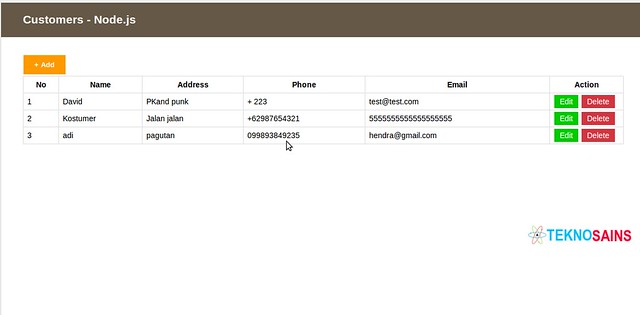
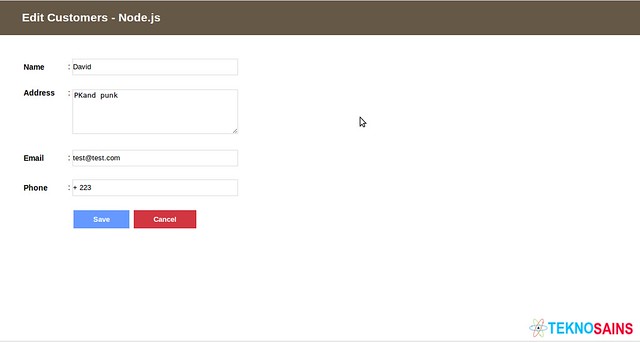
Notes : The version of express framework could be an issue, port it to your own version
Happy coding
Tuesday, October 30, 2012
MySQL DEFAULT CHARACTER SET utf8 change
ALTER DATABASE `db_name` DEFAULT CHARACTER SET utf8 COLLATE utf8_general_ci
CREATE TABLE `test`.`table1` (
`content` VARCHAR( 2000 ) CHARACTER SET utf8 COLLATE utf8_general_ci NOT NULL
) ENGINE = InnoDB CHARACTER SET utf8 COLLATE utf8_general_ci;
ALTER TABLE table_name CONVERT TO CHARACTER SET 'utf8';
Friday, May 6, 2011
MySQL create table script and Create procedure simple
CREATE TABLE IF NOT EXISTS `category` (
`id` int(10) unsigned NOT NULL AUTO_INCREMENT,
`parentid` int(11) NOT NULL,
`typecode` int(11) NOT NULL,
`siteid` int(11) NOT NULL,
`sectionid` int(11) NOT NULL,
`name` varchar(100) CHARACTER SET utf8 COLLATE utf8_unicode_ci NOT NULL,
`description` varchar(500) CHARACTER SET utf8 COLLATE utf8_unicode_ci NOT NULL,
`template` text CHARACTER SET utf8 COLLATE utf8_unicode_ci NOT NULL,
`photoid` int(11) NOT NULL,
`ordering` int(11) NOT NULL,
`capacity` int(11) NOT NULL,
`isactive` tinyint(4) NOT NULL,
PRIMARY KEY (`id`)
) ENGINE=InnoDB DEFAULT CHARSET=latin1 AUTO_INCREMENT=1 ;
'delimiter ..' энэ команд нь үйлдэл гүйцэтгэх тусгаарлах тэмдэгт болох ';' -г '..' тэмдэгтээр солидог. mysql програмд нэвтрэн орж шууд бичин хэрэглэнэ. Араас нь доор байгаа кодыг ажиллуулах боломжтой болно.
drop procedure if exists addcolumnx6..
create procedure addcolumnx6(in tablename varchar(30))
begin
set @sql=CONCAT("alter table ",tablename," ");
set @sql=CONCAT(@sql," add column created datetime not null, ");
set @sql=CONCAT(@sql," add column createdid int(10) unsigned null, ");
set @sql=CONCAT(@sql," add column createdname varchar(30) CHARACTER SET utf8 COLLATE utf8_unicode_ci NULL, ");
set @sql=CONCAT(@sql," add column modified datetime not null, ");
set @sql=CONCAT(@sql," add column modifiedid int(10) unsigned null, ");
set @sql=CONCAT(@sql," add column modifiedname varchar(30) CHARACTER SET utf8 COLLATE utf8_unicode_ci NULL; ");
PREPARE stm from @sql;
EXECUTE stm;
DEALLOCATE PREPARE stm;
end..
Бичсэн програмаа ажиллуулахдаа:
call AddColumnX6('category');
`id` int(10) unsigned NOT NULL AUTO_INCREMENT,
`parentid` int(11) NOT NULL,
`typecode` int(11) NOT NULL,
`siteid` int(11) NOT NULL,
`sectionid` int(11) NOT NULL,
`name` varchar(100) CHARACTER SET utf8 COLLATE utf8_unicode_ci NOT NULL,
`description` varchar(500) CHARACTER SET utf8 COLLATE utf8_unicode_ci NOT NULL,
`template` text CHARACTER SET utf8 COLLATE utf8_unicode_ci NOT NULL,
`photoid` int(11) NOT NULL,
`ordering` int(11) NOT NULL,
`capacity` int(11) NOT NULL,
`isactive` tinyint(4) NOT NULL,
PRIMARY KEY (`id`)
) ENGINE=InnoDB DEFAULT CHARSET=latin1 AUTO_INCREMENT=1 ;
'delimiter ..' энэ команд нь үйлдэл гүйцэтгэх тусгаарлах тэмдэгт болох ';' -г '..' тэмдэгтээр солидог. mysql програмд нэвтрэн орж шууд бичин хэрэглэнэ. Араас нь доор байгаа кодыг ажиллуулах боломжтой болно.
drop procedure if exists addcolumnx6..
create procedure addcolumnx6(in tablename varchar(30))
begin
set @sql=CONCAT("alter table ",tablename," ");
set @sql=CONCAT(@sql," add column created datetime not null, ");
set @sql=CONCAT(@sql," add column createdid int(10) unsigned null, ");
set @sql=CONCAT(@sql," add column createdname varchar(30) CHARACTER SET utf8 COLLATE utf8_unicode_ci NULL, ");
set @sql=CONCAT(@sql," add column modified datetime not null, ");
set @sql=CONCAT(@sql," add column modifiedid int(10) unsigned null, ");
set @sql=CONCAT(@sql," add column modifiedname varchar(30) CHARACTER SET utf8 COLLATE utf8_unicode_ci NULL; ");
PREPARE stm from @sql;
EXECUTE stm;
DEALLOCATE PREPARE stm;
end..
Бичсэн програмаа ажиллуулахдаа:
call AddColumnX6('category');
Subscribe to:
Posts (Atom)